Community @ The Turning Gate
Support community for TTG plugins and products.
NOTICE
The Turning Gate's Community has moved to a new home, at https://discourse.theturninggate.net.
This forum is now closed, and exists here as a read-only archive.
- New user registrations are disabled.
- Users cannot create new topics.
- Users cannot reply to existing topics.
You are not logged in.
- Topics: Active | Unanswered
#26 Re: Backlight Showcase » Finally! Site converted to Backlight » 2017-03-12 06:08:40
Rod it looks wonderful. And the images even better!
I have to figure out how you did the album set template in your gallery. I like the small thumbnail on the left and the text, all surrounded by a larger box. That's very nice.
Great job.
Dave
Edit: Ahhh. Descriptive!
#27 Re: Backlight Support » LR Publish error after updating to 1.1 » 2016-11-11 06:14:01
Thanks Ben!
No error.
#28 Re: Backlight Support » LR Publish error after updating to 1.1 » 2016-11-11 06:00:43
Ben,
My error looks the same. Publisher v 3.1.0:
Unable to perform action: setPhotoOrder
Message: Update query failed with error: SQLSTATE[HY000]: General error: 1 no such column: show_breadcrumb_for_children
sql:
'UPDATE `album` SET
`id`=\'47656\',
`publisher_root_id`=\'1\',
`parent_id`=\'\',
`type`=\'album\',
`slug`=\'Home-Splash-Album\',
`breadcrumb`=\'\',
`title`=\'Home Splash Album\',
`description`=\'\',
`template`=\'13\',
`page_copy`=\'\',
`page_copy_placement`=\'above\',
`sidebar_copy`=\'\',
`sidebar_copy_placement`=\'above\',
`tray2_copy`=\'\',
`tray2_copy_placement`=\'above\',
`enable_video`=\'no\',
`video_id`=\'\',
`cover_image`=\'\',
`items_per_page`=\'100\',
`enable_maps`=\'no\',
`enable_password`=\'no\',
`username`=\'\',
`password`=\'enc_a0636379347e32d1ff25e9cfa632d385\',
`enable_cart`=\'no\',
`pricing_scheme`=\'\',
`enable_crg`=\'no\',
`crg_feedback_profile_id`=\'\',
`crg_client_mode`=\'\',
`ordering`=\'lightroom\',
`has_user_order`=\'yes\',
`hide_from_autoindex`=\'yes\',
`hide_from_search`=\'yes\',
`show_breadcrumbs`=\'yes\',
`needs_first_visit`=\'no\',
`created`=\'2016-08-27 10:12:21\',
`modified`=\'2016-11-10 18:03:10\',
`show_breadcrumb_for_children`=\'yes\'
WHERE `id`=\'47656\''
params:
array (
) in PdoExtended.php on line 552
#29 Re: Backlight Support » LR Publish error after updating to 1.1 » 2016-11-11 03:10:39
Well I tried reloading the plugin, quit and restarted LR. Still the same error. I saved the error log but I think it is exactly like the screenshot just in a text file.
Dave
#30 Re: Backlight Support » LR Publish error after updating to 1.1 » 2016-11-11 03:07:22
Same error after restart. I just went to LR plugin manager, it says V3.0.5. Should I click reload plugin, or should I first save and send the Diagnostic Log?
Dave
#31 Re: Backlight Support » LR Publish error after updating to 1.1 » 2016-11-11 02:59:11
Yes. I re-opened LR several times to make sure it took. I will try a restart...
Dave
#32 Backlight Support » LR Publish error after updating to 1.1 » 2016-11-11 02:36:02
- dchew
- Replies: 20
I use a theater splash page, ver 1.03. Just updated to Backlight 1.1, and now after publishing to the Home Splash Album, I get the following error. It seems to work fine on the website, but the error keeps coming up. Do I need to set something different in the breadcrumb instructions?
Dave
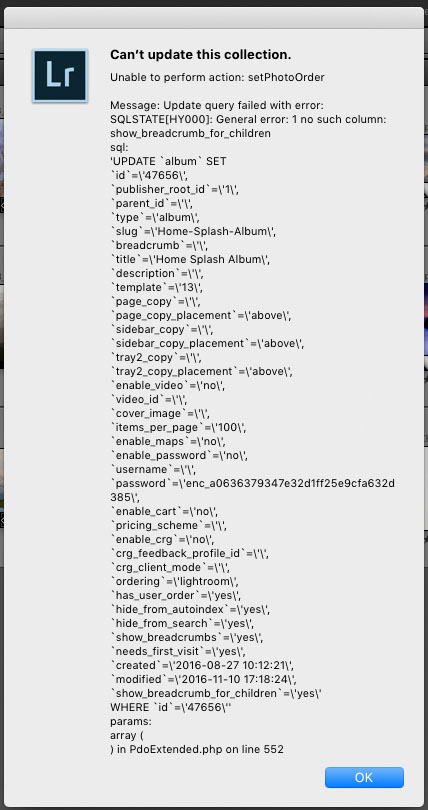
Here is the home page:
http://www.davechewphotography.com/TempBacklight/
Edit: I use GoDaddy...
#33 Re: Backlight Support » Backlight Theater Not Updating » 2016-09-07 00:27:36
Umm. No. Checked and they were turned off in multiple places. Works now.
Thank you Rod.
did you go through the Theater template serving as your home page and confirm your settings?
#34 Re: Backlight Support » Backlight Theater Not Updating » 2016-09-06 23:27:46
I wish mine did. This morning I saw the email, downloaded the Theater update, then went to the blog and saw the warning to update to Backlight 1.04 v2. So I removed the theater module, removed the three 1.04 module folders and reloaded them. Still doesn't work.
Could one of you try this page and tell me if it works on your device? I've cleared cache in Backlight and on Safari but didn't help.
http://www.davechewphotography.com/TempBacklight/
Next I'll try upgrading 1.04 v2 as if I'm coming from a version previous to 1.04.
Dave
#35 Re: Backlight Support » Backlight Theater Not Updating » 2016-09-04 21:34:35
Figured it out. Had to go back into my home page design and reselect the album. Then it updated.
I guess I don't like "burn"...
Dave
#36 Backlight Support » Backlight Theater Not Updating » 2016-09-04 20:23:00
- dchew
- Replies: 10
I'm experimenting with Theater, specifically trying different transition effects. For some reason the changes aren't updating. I hit save and the red gear icon appears as if it is saving, but the effect doesn't change.
I also tried an overlay "Overlay03" which was working last week when I tried it once, but not now. Here's the page currently set to "burn" but my view still is doing a basic fade:
http://www.davechewphotography.com/TempBacklight/
To test my host and cache I published an additional image from LR, which appears in the slide show. So I know LR to GoDaddy is working. Also, if I make a change to one of my gallery templates such as border width, that updates with no problems.
Is there something I'm not doing that I need to do?
Dave
#37 Re: Backlight Support » Best Full Screen Image Ratio? Theater Vegas FS » 2016-08-28 01:02:44
Thanks Rod. I will keep them native ratio unless it is a pano or a portrait image that I really want to use. I those cases I'll make a virtual copy and crop it closer closer to 2:1 or 3:2 - ish. That way the image won't get so blown up in Cover mode.
Dave
#38 Backlight Support » Best Full Screen Image Ratio? Theater Vegas FS » 2016-08-27 21:21:34
- dchew
- Replies: 2
Trying out the home page option for the full screen show. I like it so far but I'm trying to plan for the best crop so it appears "mostly-full-screen."
I know there is the option for Fit or Cover (I assume Repeat fills edges with another slice of the image). Is there a general rule for ratio these days with so many different formats and tool bars, side bars, ribbons and other junk people have in their browsers? Obviously I could do the 16:9 or 16:10, but that doesn't account for all that junk. For example, Safari on my MBP is about 1.8:1 because of tabs, favorites, toolbar and menu above that.
I'm looking for a ratio that would leave the least amount of blank space (Fit) or cropped away image (Cover) for the widest audience.
Dave